


Looking for the best gaming laptop under 2 lakh in India? In 2026, this budget targets serious gamers who want desktop-class performance in a portable machine. You can expect powerful HX-series Intel processors, NVIDIA RTX 50-series GPUs, QHD/2K displays, 165Hz–240Hz refresh rates, 16GB+ RAM, 1TB SSD storage, and advanced cooling systems.
However, specifications alone do not determine the right gaming laptop. GPU power and TGP, cooling, display quality, RAM, and upgradeability can significantly affect real-world performance and long-term value.
This guide compares five options across different needs: ASUS ROG Strix G16, MSI Katana 15 HX, HP Omen, Lenovo Legion 5, and Acer Nitro 5 Pro. Each offers a different balance of gaming performance, portability, display quality, and hardware configuration.
Table of Contents
1: 5 Best Gaming Laptop Under 2 Lakh in India (2026)
1.1: ASUS ROG Strix G16, Intel Core Ultra 9 275HX Gaming Laptop
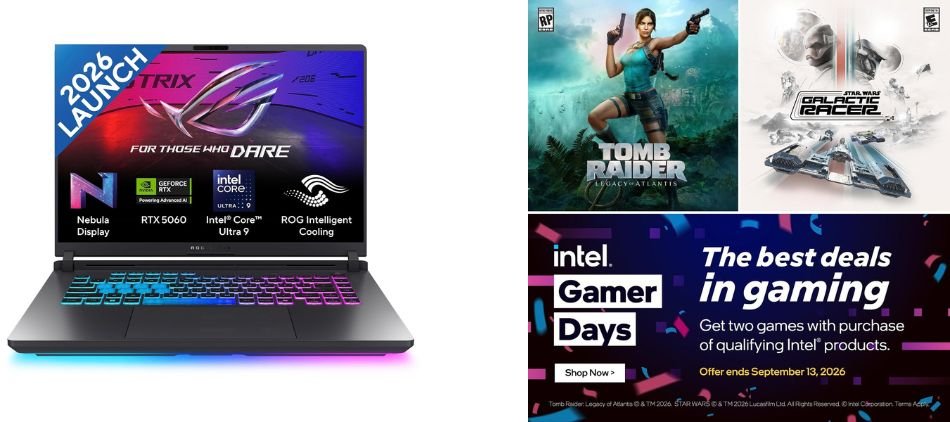
The ASUS ROG Strix G16 combines a Core Ultra 9 275HX processor, RTX 5060 8GB graphics, 16GB RAM, and a 1TB SSD with a sharp 2.5K 240Hz display. It is built for demanding gaming and everyday high-performance use.
Key Specifications
| Specification | Details |
|---|---|
| Model | ASUS ROG Strix G16 G615LM-S5128WS |
| Processor | Intel Core Ultra 9 275HX |
| Graphics | NVIDIA GeForce RTX 5060 Laptop GPU |
| GPU Memory | 8GB |
| GPU Power | Up to 115W TGP |
| Display | 16-inch 2.5K QHD+ |
| Refresh Rate | 240Hz |
| RAM | 16GB |
| Storage | 1TB SSD |
| Battery | 90Wh |
| Operating System | Windows 11 |
| Office | Office Home 2024 / Microsoft 365 Basic 1 Year |
| Colour | Eclipse Gray |
Gaming Performance
With the RTX 5060 running at up to 115W TGP, the ROG Strix G16 is well-equipped for modern AAA and esports gaming. The 240Hz refresh rate also delivers smooth visuals and responsive gameplay in competitive titles.
Pros and Cons
✓ Pros
- Powerful Intel Core Ultra 9 275HX processor
- RTX 5060 with 8GB dedicated graphics memory
- Up to 115W GPU TGP
- Sharp 2.5K display with a fast 240Hz refresh rate
- Large 90Wh battery
- 1TB SSD provides useful high-speed storage
- Suitable for gaming, content creation, and demanding multitasking
- Premium ROG Strix gaming design
× Cons
- 16GB RAM may be limiting for some heavy workloads over time
- High-performance hardware can increase heat and fan noise during demanding gaming
- 2.5K gaming at very high settings can place significant demands on the RTX 5060
Best For
1.2: MSI Katana 15 HX Intel Core i9-14900HX Gaming Laptop

The MSI Katana 15 HX combines the powerful Intel Core i9-14900HX processor with RTX 5050 8GB GDDR7 graphics, 16GB RAM, and a 1TB SSD. Its 15.6-inch QHD 165Hz display makes it a capable choice for gaming and demanding everyday workloads.
Key Specifications
| Specification | Details |
|---|---|
| Processor | Intel Core i9-14900HX |
| Graphics | NVIDIA GeForce RTX 5050 |
| GPU Memory | 8GB GDDR7 |
| Display | 15.6-inch QHD |
| Refresh Rate | 165Hz |
| RAM | 16GB |
| Storage | 1TB SSD |
| Operating System | Windows 11 Home |
| Weight | 2.4 Kg |
| Warranty | 2 Years |
| Model | B14WEK-264IN |
| Colour | Black |
Gaming Performance
The MSI Katana 15 HX delivers strong gaming performance with its Core i9-14900HX processor and RTX 5050 8GB graphics. The 165Hz QHD display provides smooth visuals and sharp image quality, making it suitable for both competitive esports and graphically demanding games.
Pros and Cons
Pros and Cons
✓ Pros
- Powerful Core i9-14900HX processor
- RTX 5050 with 8GB GDDR7 memory
- QHD 165Hz display
- 16GB RAM and 1TB SSD
- 2-year warranty
× Cons
- 2.4 Kg weight makes it less portable
- High-performance hardware can produce more heat and fan noise
Best For
1.3: HP Omen Smartchoice Intel Core i7-14650HX Gaming Laptop
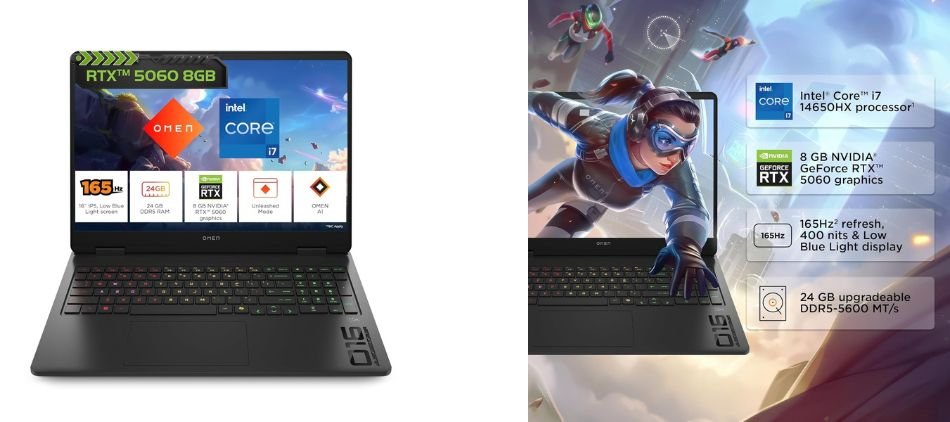
The HP Omen Smartchoice am0239TX is a performance-focused gaming laptop featuring an Intel Core i7-14650HX processor, RTX 5060 8GB graphics, 24GB DDR5 RAM, and a 1TB SSD. Its 16-inch 2K WUXGA display offers a 165Hz refresh rate, 3ms response time, and 400-nit brightness for smooth, detailed gaming.
Key Specifications
| Specification | Details |
|---|---|
| Processor | Intel Core i7-14650HX |
| Graphics | NVIDIA GeForce RTX 5060 |
| GPU Memory | 8GB |
| RAM | 24GB DDR5, Upgradeable |
| Storage | 1TB SSD |
| Display | 16-inch 2K WUXGA |
| Refresh Rate | 165Hz |
| Response Time | 3ms |
| Brightness | 400 nits |
| Operating System | Windows 11 |
| Office | Office Home 2024 |
| Weight | 2.4 Kg |
| Model | am0239TX |
Gaming Performance
The RTX 5060 8GB and Core i7-14650HX combination provides strong performance for modern AAA and esports games. The 165Hz refresh rate and 3ms response time help deliver responsive gameplay, while the 2K WUXGA resolution provides sharper visuals.
Pros and Cons
Pros and Cons
✓ Pros
- Powerful Core i7-14650HX processor
- RTX 5060 8GB graphics
- 24GB DDR5 RAM
- 1TB SSD
- 165Hz 2K display
- 400-nit brightness
- Upgradeable memory
× Cons
- 2.4 Kg weight
- High-performance gaming can generate heat and fan noise
Best For
1.4: Lenovo Legion 5 2025 Intel Core i7-13650HX Gaming Laptop
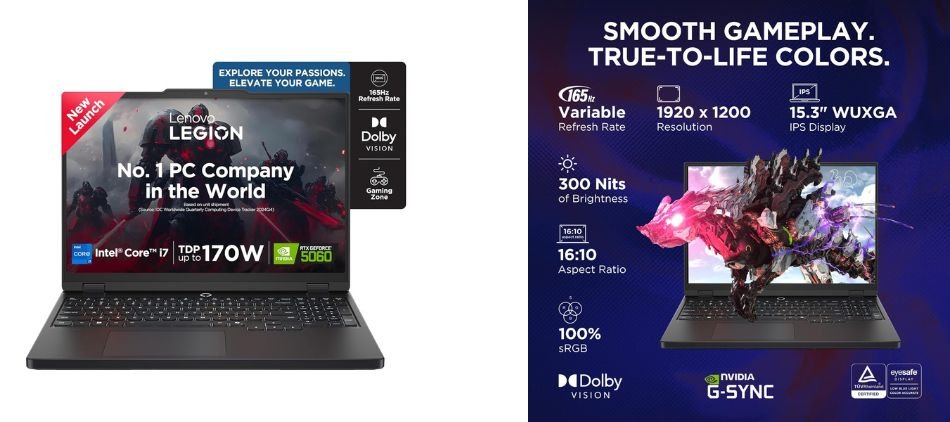
The Lenovo Legion 5 83LY00SVIN is a performance-focused gaming laptop powered by an Intel Core i7-13650HX processor and NVIDIA RTX 5060 8GB graphics. It combines 16GB RAM, a 1TB SSD, and a 15.3-inch WUXGA IPS display with a 165Hz refresh rate in a relatively portable 2.1kg design.
Key Specifications
| Specification | Details |
|---|---|
| Processor | Intel Core i7-13650HX |
| Graphics | NVIDIA GeForce RTX 5060 |
| GPU Memory | 8GB |
| RAM | 16GB |
| Storage | 1TB SSD |
| Display | 15.3-inch WUXGA IPS |
| Refresh Rate | 165Hz |
| Operating System | Windows 11 |
| Office | Office Home 2024 |
| AI Features | AI Now |
| Weight | 2.1 Kg |
| Model | 83LY00SVIN |
Gaming Performance
The RTX 5060 8GB paired with the Core i7-13650HX makes the Legion 5 suitable for modern AAA and esports gaming. Its 165Hz display provides smooth motion and responsive gameplay, while the RTX 5060 supports advanced NVIDIA gaming features for demanding titles.
Pros and Cons
Pros and Cons
✓ Pros
- Powerful Core i7-13650HX processor
- RTX 5060 with 8GB graphics memory
- Fast 165Hz IPS display
- 16GB RAM and 1TB SSD
- Relatively lightweight at 2.1kg
- Office Home 2024 included
× Cons
- WUXGA resolution is lower than QHD
- 16GB RAM may eventually feel limiting for heavier workloads
Best For
1.5: Acer Nitro 5 Pro Intel Core i7-14650HX Gaming Laptop

The Acer Nitro 5 Pro AN5P16-74G2 is a performance-oriented gaming laptop powered by an Intel Core i7-14650HX processor and NVIDIA GeForce RTX 5050 8GB graphics. It also features 16GB RAM, a 1TB SSD, and a 16-inch WUXGA IPS display with a 165Hz refresh rate.
Key Specifications
| Specification | Details |
|---|---|
| Processor | Intel Core i7-14650HX |
| Graphics | NVIDIA GeForce RTX 5050 |
| GPU Memory | 8GB |
| RAM | 16GB |
| Storage | 1TB SSD |
| Display | 16-inch WUXGA IPS |
| Refresh Rate | 165Hz |
| Battery | 73Wh |
| Operating System | Windows 11 Home |
| Office | Office 2024 + Microsoft 365 Basic |
| Keyboard | RGB |
| Weight | 2.5 Kg |
| Model | AN5P16-74G2 |
Gaming Performance
The combination of the Core i7-14650HX and RTX 5050 8GB provides capable performance for modern AAA and esports gaming. Its 165Hz display delivers smooth motion and responsive gameplay, while the dedicated RTX graphics support demanding games and GPU-accelerated applications.
Pros and Cons
Pros and Cons
✓ Pros
- Powerful Core i7-14650HX processor
- RTX 5050 with 8GB graphics memory
- 16GB RAM and 1TB SSD
- 165Hz WUXGA IPS display
- 73Wh battery
- RGB keyboard
- Office 2024 included
× Cons
- 2.5 Kg chassis is relatively heavy
- WUXGA resolution is below QHD
Best For
2: Comparison Table
| Laptop | Processor | GPU | RAM | Storage | Display | Weight |
|---|---|---|---|---|---|---|
| ASUS ROG Strix G16 | Core Ultra 9 275HX | RTX 5060 8GB | 16GB | 1TB | 16″ 2.5K 240Hz | — |
| MSI Katana 15 HX | Core i9-14900HX | RTX 5050 8GB | 16GB | 1TB | 15.6″ QHD 165Hz | 2.4kg |
| HP Omen | Core i7-14650HX | RTX 5060 8GB | 24GB | 1TB | 16″ WUXGA 165Hz | 2.4kg |
| Lenovo Legion 5 | Core i7-13650HX | RTX 5060 8GB | 16GB | 1TB | 15.3″ WUXGA 165Hz | 2.1kg |
| Acer Nitro 5 Pro | Core i7-14650HX | RTX 5050 8GB | 16GB | 1TB | 16″ WUXGA 165Hz | 2.5kg |
3: RTX 5060 vs RTX 5050: Which GPU Should You Choose?
The RTX 5060 laptop GPU offers higher gaming performance and is better suited for demanding AAA titles and higher-resolution gaming. The RTX 5050 is a capable option for 1080p/WUXGA gaming and users prioritizing value.
| Feature | RTX 5060 Laptop | RTX 5050 Laptop |
|---|---|---|
| GPU Generation | NVIDIA Blackwell | NVIDIA Blackwell |
| VRAM | 8GB GDDR7 | 8GB GDDR7 |
| Performance | Higher | Lower |
| AAA Gaming | Better suited | Capable |
| Esports Gaming | Excellent | Excellent |
| High-Resolution Gaming | Better choice | Suitable with adjusted settings |
| Ray Tracing | Stronger | Capable |
| Best For | 1440p/QHD gaming | 1080p/WUXGA gaming |
4: 165Hz vs 240Hz: Does Refresh Rate Matter?
Higher refresh rates make gaming smoother, but the difference depends heavily on your FPS. 60Hz is basic, 120Hz feels noticeably smoother, while 144Hz and 165Hz offer an excellent balance for most gamers. 240Hz provides even smoother motion and lower perceived latency, but its benefits are most noticeable when the laptop can consistently produce very high FPS.
240Hz Makes More Sense For:
- Competitive FPS gaming
- Valorant
- Counter-Strike 2
- Apex Legends
- Competitive Fortnite
165Hz Is Enough For:
- AAA games
- RPGs
- Story-driven games
- General gaming
For most gamers, 165Hz is already excellent. Choose 240Hz when competitive performance and consistently high FPS are priorities.
5: Which Gaming Laptop Is Best for You?
Choose a gaming laptop based on how you plan to use it rather than specifications alone.
For AAA Gaming: Look for an RTX 5060, strong cooling, higher GPU TGP, and a good QHD or 2K display.
For Esports Gaming: Prioritize a 165Hz or 240Hz refresh rate, fast response time, powerful CPU, and high FPS performance.
For Students: Focus on lighter weight, battery life, portability, and productivity features for everyday use.
For Content Creators: Choose a powerful CPU, dedicated GPU, 32GB-capable RAM, and a high-resolution display.
For Long Gaming Sessions: Cooling is crucial. Check thermal performance, fan noise, cooling design, and sustained power limits before buying.
6: Gaming Laptop Features You Shouldn’t Ignore
Before buying a gaming laptop, check these important features beyond the CPU and GPU:
- Connectivity: Wi-Fi 6/6E/7, Bluetooth, USB-C, HDMI, Ethernet, and DisplayPort support.
- Webcam & Audio: Check webcam quality and speaker performance for calls, streaming, and entertainment.
- Keyboard: Look for comfortable keys, good travel, and useful RGB lighting.
- Upgrades: Prefer models with upgradeable RAM and SSD for easier future expansion.
- Warranty: Check warranty duration and available service support before purchasing.
A well-equipped gaming laptop should offer the right combination of connectivity, usability, upgradeability, and long-term support.
7: Frequently Asked Questions (FAQs)
Q1. Which is the best gaming laptop under 2 lakh in India in 2026?
The right choice depends on your GPU, display, cooling, and performance requirements. Compare specifications rather than price alone.
Q2. Is an RTX 5060 gaming laptop good for gaming in 2026?
Yes. The RTX 5060 is well-suited for modern AAA, esports, and high-resolution gaming.
Q3. Is 16GB RAM enough for a gaming laptop in 2026?
Yes, 16GB is suitable for most games, but upgradeable RAM provides better long-term flexibility.
Q4. Is a 240Hz display better than 165Hz?
240Hz can provide smoother motion in high-FPS competitive games, while 165Hz is sufficient for most gaming.
Q5. Should I buy RTX 5060 or RTX 5050?
Choose RTX 5060 for higher performance; RTX 5050 can suit value-focused 1080p/WUXGA gaming.
Q6. What should I check before buying?
Check GPU TGP, cooling, display, RAM, SSD, battery, ports, upgradeability, and warranty.
8: Conclusion
Choosing the right gaming laptop under 2 lakh depends on your specific gaming and productivity needs rather than one universal winner.
| If You Prioritize… | Consider |
|---|---|
| High-resolution + high-refresh gaming | ASUS ROG Strix G16 |
| CPU-heavy workloads | MSI Katana 15 HX |
| RAM + RTX 5060 | HP Omen |
| Lower weight | Lenovo Legion 5 |
| RTX 5050 configuration | Acer Nitro 5 Pro |
For competitive gaming, prioritize refresh rate, response time, and sustained FPS. For AAA gaming, focus on GPU performance, TGP, cooling, and display quality. Students may prefer lighter models, while creators should consider CPU, GPU, RAM, and display resolution.
Check the latest prices, availability, warranty, and seller details before buying, because gaming laptop prices and configurations can change frequently in India.
Also Read: