


Choosing the Best Gaming Motherboards Under 60000 is important for building a powerful and future-ready gaming PC in 2026. A good motherboard ensures CPU compatibility, stable VRM power delivery, DDR5 memory support, and PCIe 5.0 connectivity for modern graphics cards and high-speed SSDs. Features such as Wi-Fi 7, high-speed LAN, multiple M.2 slots, and Thunderbolt connectivity further improve gaming, storage expansion, and overall system performance.
In this guide, we compare five motherboards: ASUS ROG Strix Z890-F Gaming Wi-Fi, ASUS TUF Gaming Z890-PRO Wi-Fi, GIGABYTE Z890 AERO D, MSI MEG Z690 UNIFY and ASUS ROG Strix TRX40-E Gaming. Each offers different features and platform compatibility for gaming enthusiasts and workstation users. Before purchasing, consider CPU compatibility, BIOS support, cooling, memory configuration, and other system components, as actual performance depends on the complete PC build.
Table of Contents
1: Best Gaming Motherboards Under 60000 in India (2026)
1.1: ASUS ROG Strix Z890-F Gaming Wi-Fi Motherboard
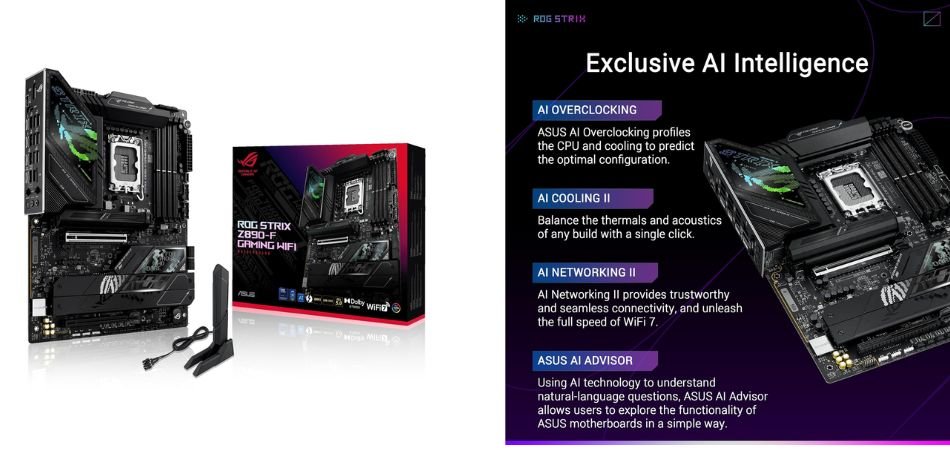
The ASUS ROG Strix Z890-F Gaming Wi-Fi is a premium Intel LGA 1851 motherboard designed for high-performance gaming PCs. With DDR5 memory, PCIe 5.0 support, Wi-Fi 7, five M.2 slots, and advanced power delivery, it offers an excellent foundation for demanding gaming and productivity builds in 2026.
Key Specifications
| Specification | Details |
|---|---|
| Model | ASUS ROG Strix Z890-F Gaming Wi-Fi |
| Chipset | Intel Z890 |
| CPU Socket | Intel LGA 1851 |
| Processor Support | Intel Core Ultra Processors (Series 2) |
| Form Factor | ATX |
| Memory | 4 × DDR5 DIMM slots |
| Maximum Memory | Up to 256GB |
| Memory Speed | Up to 9066+ MT/s (OC) |
| Power Design | 16+1+2+2 power stages |
| Graphics Slot | 1 × PCIe 5.0 x16 |
| Additional Slot | 1 × PCIe 4.0 x16 (x4 mode) |
| M.2 Slots | 5 (1 × PCIe 5.0, 4 × PCIe 4.0) |
| SATA Ports | 4 × SATA 6Gb/s |
| Wireless Connectivity | Wi-Fi 7 |
| Bluetooth | Bluetooth 5.4 |
| Ethernet | Intel 2.5Gb Ethernet |
| USB Connectivity | Thunderbolt 4, USB 10Gbps, USB 5Gbps and USB 2.0 |
| Audio | ROG SupremeFX ALC4080, Savitech SV3H712 amplifier |
| Cooling | VRM and M.2 heatsinks, AI Cooling II |
| RGB Lighting | Polymo Lighting, Aura Sync |
| BIOS Features | BIOS FlashBack, Clear CMOS |
| Operating System | Windows 11 |
Gaming Performance and Stability
The ASUS ROG Strix Z890-F provides a strong foundation for high-end gaming systems. Its robust VRM design, PCIe 5.0 graphics support, and advanced cooling help maintain stable operation with compatible Intel Core Ultra processors. However, actual gaming FPS depends on the processor, graphics card, cooling, and game settings.
Who Should Buy It?
This motherboard is suitable for enthusiasts building premium Intel gaming PCs who want DDR5 memory, multiple NVMe SSDs, next-generation connectivity, and extensive upgrade flexibility.
Pros and Cons
✓ Pros
- Powerful 16+1+2+2 power delivery design.
- Supports high-speed DDR5 memory.
- Five M.2 storage slots.
- PCIe 5.0 graphics and SSD support.
- Wi-Fi 7 and Bluetooth 5.4 connectivity.
- Dual Thunderbolt 4 ports.
× Cons
- Premium pricing compared with mainstream Z890 motherboards.
- Requires an LGA 1851-compatible processor.
- Many advanced features may be unnecessary for budget gaming builds.
Best For
1.2: ASUS TUF Gaming Z890-PRO WiFi Motherboard
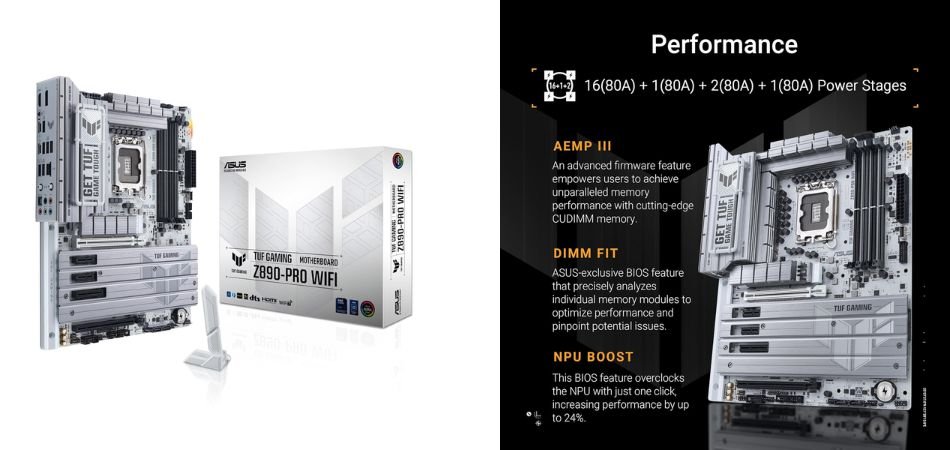
The ASUS TUF Gaming Z890-PRO WiFi is a feature-rich ATX motherboard designed for Intel Core Ultra Series 2 processors. Its DDR5 memory support, PCIe 5.0 connectivity, 16+1+2+1 power stages, Wi-Fi 7, and four M.2 slots make it a strong option for premium gaming PCs and demanding multitasking builds in 2026.
Key Specifications
| Specification | Details |
|---|---|
| Model | ASUS TUF Gaming Z890-PRO WiFi |
| Chipset | Intel Z890 |
| CPU Socket | Intel LGA 1851 |
| Processor Support | Intel Core Ultra Processors (Series 2) |
| Form Factor | ATX (305 × 244 mm) |
| Memory | 4 × DDR5 DIMM slots |
| Maximum Memory | Up to 256GB |
| Memory Speed | Up to 9066+ MT/s (OC) |
| Power Design | 16+1+2+1 80A DrMOS power stages |
| Graphics Slot | 1 × PCIe 5.0 x16 |
| Expansion Slots | PCIe 4.0 x16, PCIe 4.0 x4, 2 × PCIe 4.0 x1 |
| M.2 Slots | 4 (1 × PCIe 5.0, 3 × PCIe 4.0) |
| SATA Ports | 4 × SATA 6Gb/s |
| Wireless Connectivity | Wi-Fi 7 |
| Bluetooth | Bluetooth 5.4 |
| Ethernet | Intel 2.5Gb Ethernet |
| USB Connectivity | 2 × Thunderbolt 4 Type-C, 6 × USB 10Gbps Type-A |
| Front USB | USB 20Gbps Type-C with up to 30W charging |
| Audio | Realtek ALC1220P 7.1-channel audio |
| Cooling | VRM heatsinks, M.2 heatsinks, AI Cooling II |
| BIOS Features | BIOS FlashBack, ASUS UEFI BIOS |
| RGB Support | Aura Sync, Addressable Gen 2 headers |
Gaming Performance and Stability
The ASUS TUF Gaming Z890-PRO WiFi offers reliable power delivery through its 16+1+2+1 80A DrMOS design. PCIe 5.0 graphics support, DDR5 memory, and advanced VRM cooling make it suitable for powerful gaming configurations. Actual gaming performance depends on the installed processor, graphics card, cooling system, and game settings.
Who Should Buy It?
This motherboard is ideal for gamers, PC enthusiasts, and content creators planning an Intel Core Ultra Series 2 desktop build. It is particularly suitable for users who need fast DDR5 memory, multiple NVMe SSDs, Wi-Fi 7, and high-speed Thunderbolt 4 connectivity.
Pros & Cons
✓ Pros
- Powerful 16+1+2+1 80A DrMOS power delivery.
- Supports DDR5 memory up to 9066+ MT/s (OC).
- PCIe 5.0 support for next-generation graphics cards.
- Four M.2 slots for high-speed SSD storage.
- Wi-Fi 7 and 2.5Gb Ethernet connectivity.
- Dual Thunderbolt 4 Type-C ports.
× Cons
- Premium pricing compared with mainstream motherboards.
- Requires an Intel LGA 1851-compatible processor.
- Advanced features may be unnecessary for entry-level gaming builds.
Best For
1.3: GIGABYTE Z890 AERO D Motherboard
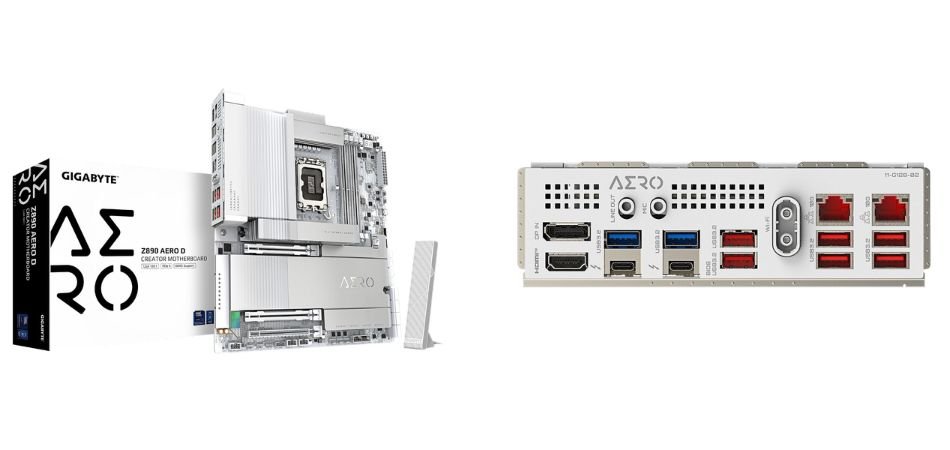
The GIGABYTE Z890 AERO D is a premium E-ATX motherboard built for Intel Core Ultra Series 2 processors. Featuring DDR5 memory support, dual Thunderbolt 5 ports, Wi-Fi 7, dual 10GbE LAN, and PCIe 5.0 expansion, it combines high-end gaming capabilities with professional workstation connectivity. Its clean design and extensive storage options make it an attractive choice for enthusiasts and creators in 2026.
Key Specifications
| Specification | Details |
|---|---|
| Model | GIGABYTE Z890 AERO D |
| Chipset | Intel Z890 Express |
| CPU Socket | Intel LGA 1851 |
| Processor Support | Intel Core Ultra Processors (Series 2) |
| Form Factor | E-ATX (305 × 285 mm) |
| Memory | 4 × DDR5 DIMM slots |
| Maximum Memory | Up to 256GB |
| Memory Speed | Up to DDR5 9500 MT/s (OC) |
| Memory Architecture | Dual-channel |
| Graphics Slots | 2 × PCIe 5.0 x16 slots |
| Additional Slot | 1 × PCIe 4.0 x16 (x4 mode) |
| M.2 Slots | 4 × M.2 NVMe slots |
| M.2 Support | PCIe 5.0 and PCIe 4.0 |
| SATA Connectivity | 8 × SATA 6Gb/s |
| Wireless Connectivity | Intel Wi-Fi 7 |
| Bluetooth | Bluetooth 5.4 |
| Ethernet | Dual 10GbE LAN |
| USB Connectivity | 2 × Thunderbolt 5 Type-C |
| Additional USB | USB 20Gbps, USB 10Gbps, USB 5Gbps and USB 2.0 |
| Audio | ESS ES9080 CODEC and Realtek ALC897 |
| Display Output | HDMI 2.1 and Thunderbolt display support |
| Cooling | Advanced VRM and M.2 heatsinks |
| BIOS | Dual BIOS, Q-Flash Plus |
| Operating System | Windows 11 64-bit |
Gaming Performance and Stability
The GIGABYTE Z890 AERO D offers a powerful foundation for demanding gaming configurations. Its PCIe 5.0 expansion, high-speed DDR5 support, and advanced power delivery help support high-performance Intel processors and graphics cards. Dual 10GbE networking and effective thermal design add value for demanding workloads. Actual gaming FPS depends on the CPU, GPU, cooling, and game settings.
Who Should Buy It?
This motherboard is ideal for gaming enthusiasts, professional content creators, and PC builders who need premium connectivity, multi-GPU expansion, high-speed networking, and extensive NVMe storage. It is especially suited for users building powerful Intel-based gaming and workstation PCs.
Pros & Cons
✓ Pros
- Supports Intel Core Ultra Series 2 processors.
- DDR5 memory support up to 9500 MT/s (OC).
- Dual PCIe 5.0 x16 expansion slots.
- Four M.2 slots for high-speed NVMe storage.
- Dual Thunderbolt 5 Type-C connectivity.
- Wi-Fi 7 and dual 10GbE LAN networking.
× Cons
- Premium pricing compared with mainstream Z890 motherboards.
- E-ATX form factor requires a compatible PC case.
- Advanced connectivity may be excessive for standard gaming builds.
Best For
1.4: MSI MEG Z690 UNIFY Motherboard
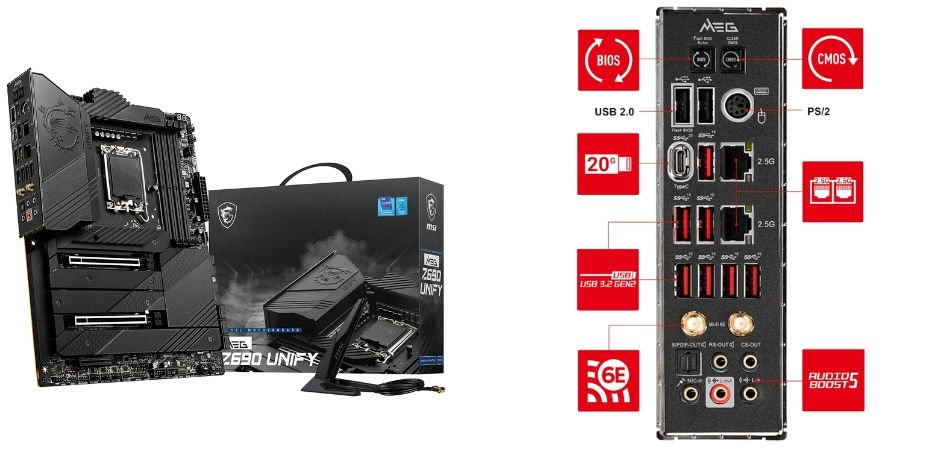
The MSI MEG Z690 UNIFY is a premium ATX gaming motherboard designed for Intel 12th Gen Core processors. Featuring DDR5 memory, Intel Wi-Fi 6E, five M.2 slots, and powerful 105A Smart Power Stages, it delivers enthusiast-level connectivity, storage expansion, and overclocking potential for high-performance gaming PCs.
Key Specifications
| Specification | Details |
|---|---|
| Model | MSI MEG Z690 UNIFY |
| Chipset | Intel Z690 |
| CPU Socket | Intel LGA 1700 |
| Processor Support | Intel Core 12th, 13th and 14th Gen (BIOS support may be required) |
| Form Factor | ATX (305 × 244 mm) |
| Memory | 4 × DDR5 DIMM slots |
| Maximum Memory | 192GB |
| Memory Speed | Up to DDR5 6666+ MT/s (OC) |
| Memory Architecture | Dual-channel |
| Power Design | 19+2 phases with 105A Smart Power Stages |
| Graphics Slots | 2 × PCIe 5.0 x16 (x16 or x8/x8) |
| Additional Slot | 1 × PCIe 3.0 x4 |
| M.2 Slots | 5 × M.2 |
| M.2 Connectivity | 4 × PCIe 4.0 x4, 1 × PCIe 3.0 x4 |
| SATA Ports | 6 × SATA 6Gb/s |
| RAID Support | RAID 0, 1, 5 and 10 |
| Wireless Connectivity | Intel Wi-Fi 6E |
| Bluetooth | Bluetooth 5.3 |
| Ethernet | 2 × Intel 2.5Gb LAN |
| USB Connectivity | USB 3.2 Gen 2×2 Type-C, USB 3.2 Gen 2 Type-A |
| Audio | Realtek ALC4080 7.1-channel HD Audio with Optical S/PDIF |
| Cooling | VRM heatsink, heat pipe, M.2 Shield Frozr |
| PCB Design | 8-layer PCB with 2oz copper |
| BIOS Features | Flash BIOS Button, 2-digit Debug LED |
| Operating System | Windows 10 and Windows 11 (64-bit) |
Gaming Performance and Stability
The MSI MEG Z690 UNIFY is designed for demanding gaming configurations, with robust 19+2-phase power delivery, PCIe 5.0 graphics support, and DDR5 overclocking. Its extensive M.2 cooling and 8-layer PCB help support stable operation during intensive workloads. Actual gaming FPS depends on the processor, graphics card, memory configuration, and game settings.
Who Should Buy It?
This motherboard is ideal for enthusiasts building high-performance Intel gaming PCs with 12th, 13th, or 14th Gen processors. It is particularly suitable for overclocking enthusiasts, competitive gamers, and users who need multiple NVMe SSDs, dual 2.5Gb Ethernet, and advanced connectivity.
Pros and Cons
✓ Pros
- Powerful 19+2-phase 105A Smart Power Stage design.
- Supports DDR5 memory up to 6666+ MT/s (OC).
- Five M.2 slots for extensive SSD expansion.
- Dual PCIe 5.0 x16 graphics slots.
- Intel Wi-Fi 6E and dual 2.5Gb LAN.
- Advanced M.2 Shield Frozr and VRM cooling.
× Cons
- Uses the older Intel LGA 1700 platform.
- No built-in Wi-Fi 7 connectivity.
- Premium enthusiast features may be excessive for budget gaming builds.
Best For
1.5: ASUS ROG Strix TRX40-E Gaming Motherboard
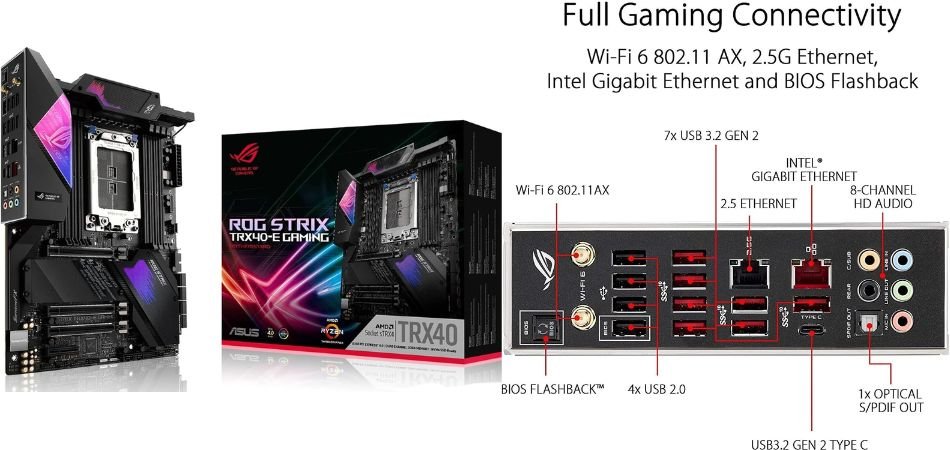
The ASUS ROG Strix TRX40-E Gaming is a premium ATX motherboard designed for AMD 3rd Gen Ryzen Threadripper processors. Built on the TRX40 chipset, it features quad-channel DDR4 memory, PCIe 4.0 expansion, three M.2 slots, Wi-Fi 6, and powerful 16-phase power delivery. It is designed for demanding gaming, workstation, and content creation builds. The attached Amazon listing is marked Open Box, so buyers should carefully check its condition and included accessories.
Key Specifications
| Specification | Details |
|---|---|
| Model | ASUS ROG Strix TRX40-E Gaming |
| Chipset | AMD TRX40 |
| CPU Socket | AMD sTRX4 |
| Processor Support | 3rd Gen AMD Ryzen Threadripper |
| Form Factor | ATX (305 × 244 mm) |
| Memory | 8 × DDR4 DIMM slots |
| Maximum Memory | 256GB |
| Memory Speed | Up to 4666 MHz (OC) |
| Memory Architecture | Quad-channel |
| ECC Support | ECC and Non-ECC Unbuffered |
| Power Design | 16 power stages |
| Graphics Slots | 3 × PCIe 4.0 x16 |
| Additional Slot | 1 × PCIe 4.0 x4 |
| Multi-GPU Support | NVIDIA 2-Way SLI and AMD 2-Way CrossFireX |
| M.2 Slots | 3 × M.2 |
| M.2 Connectivity | PCIe 4.0 x4 and SATA support |
| SATA Ports | 8 × SATA 6Gb/s |
| RAID Support | RAID 0, 1 and 10 |
| Wireless Connectivity | Intel Wi-Fi 6 AX200 |
| Bluetooth | Bluetooth 5.0 |
| Ethernet | Realtek 2.5Gb LAN + Intel Gigabit LAN |
| USB Connectivity | 8 × USB 3.2 Gen 2 (7 Type-A, 1 Type-C) |
| Additional USB | 4 × USB 2.0 and internal USB headers |
| Audio | SupremeFX S1220 8-channel HD Audio |
| Audio Features | Dual OP Amplifiers, DTS Sound Unbound |
| Display | No onboard graphics output |
| Special Features | LiveDash OLED, Aura Sync RGB |
| BIOS Features | USB BIOS FlashBack, ASUS EZ Flash 3 |
| Operating System | Windows 10 and Windows 11 (64-bit) |
Gaming Performance and Stability
The ASUS ROG Strix TRX40-E Gaming provides a capable foundation for Threadripper-based gaming systems. Its 16 power stages, PCIe 4.0 expansion, and quad-channel memory architecture support demanding workloads. However, gaming FPS depends on the installed GPU, processor, and game optimisation.
Who Should Buy It?
This motherboard is suitable for enthusiasts, professional creators, and users building AMD Threadripper workstations. It is particularly useful for buyers requiring extensive PCIe expansion, large memory capacity, and multiple NVMe SSDs.
Pros and Cons
✓ Pros
- Supports powerful AMD Ryzen Threadripper processors.
- Eight DDR4 memory slots with up to 256GB capacity.
- Quad-channel memory architecture.
- Three PCIe 4.0 x16 expansion slots.
- Three M.2 slots and eight SATA ports.
- Wi-Fi 6, dual Ethernet and SupremeFX audio.
× Cons
- Supports only the older sTRX4 platform.
- No DDR5 or PCIe 5.0 support.
- Open-box condition may involve missing accessories or limited warranty coverage.
Best For
Important buying advice: This is an older-generation motherboard, not a modern mainstream gaming platform. Before purchasing the Open Box unit, verify its working condition, BIOS version, accessories, and seller warranty. Also, it is compatible with 3rd Gen Threadripper processors, not standard Ryzen AM4 or AM5 CPUs.
2: Comparison Table
| Motherboard | Chipset | Socket | Memory | Connectivity |
|---|---|---|---|---|
| ASUS ROG Strix Z890-F Gaming WiFi | Intel Z890 | LGA 1851 | 4× DDR5, up to 256GB, 9066+ MT/s (OC) | Wi-Fi 7, Bluetooth 5.4, 2.5Gb Ethernet, 2× Thunderbolt 4, 5× M.2, 4× SATA |
| ASUS TUF Gaming Z890-PRO WiFi | Intel Z890 | LGA 1851 | 4× DDR5, up to 256GB, 9066+ MT/s (OC) | Wi-Fi 7, Bluetooth 5.4, 2.5Gb Ethernet, 2× Thunderbolt 4, 4× M.2, 4× SATA |
| GIGABYTE Z890 AERO D | Intel Z890 | LGA 1851 | 4× DDR5, up to 256GB, 9500 MT/s (OC) | Wi-Fi 7, Bluetooth 5.4, Dual 10GbE LAN, 2× Thunderbolt 5, 4× M.2, 8× SATA |
| MSI MEG Z690 UNIFY | Intel Z690 | LGA 1700 | 4× DDR5, up to 192GB, 6666+ MT/s (OC) | Wi-Fi 6E, Bluetooth 5.3, Dual 2.5Gb Ethernet, 5× M.2, 6× SATA, USB 20Gbps Type-C |
| ASUS ROG Strix TRX40-E Gaming | AMD TRX40 | sTRX4 | 8× DDR4, up to 256GB, 4666 MT/s (OC) | Wi-Fi 6, Bluetooth 5.0, 2.5Gb + 1Gb Ethernet, 3× M.2, 8× SATA, USB 3.2 Gen 2 |
3: Which Gaming Motherboard Should You Buy?
Choosing the best gaming motherboard depends on your processor, budget, and connectivity requirements. Here are our top recommendations for different PC builds in 2026.
| Category | Recommended Motherboard |
|---|---|
| Best Overall | ASUS ROG Strix Z890-F |
| Best for Gaming | ASUS TUF Gaming Z890-PRO |
| Best for Connectivity | GIGABYTE Z890 AERO D |
| Best for Intel LGA 1700 Builds | MSI MEG Z690 UNIFY |
| Best for Threadripper Workstations | ASUS ROG Strix TRX40-E Gaming |
4: Gaming Motherboard Buying Guide
Before buying a gaming motherboard, consider these seven important factors to ensure compatibility, performance, and future upgrade flexibility.
CPU and Socket Compatibility
- LGA 1851: Intel Core Ultra Series 2.
- LGA 1700: Compatible with Intel 12th, 13th, and 14th Gen processors.
- sTRX4: AMD 3rd Gen Ryzen Threadripper.
- Check CPU generation and BIOS compatibility.
VRM and Power Delivery
Choose a motherboard with quality VRMs, sufficient power stages, and effective heatsinks for stable CPU power delivery, especially with high-performance processors.
DDR5 vs DDR4 RAM
- DDR5 offers higher bandwidth and newer platform support.
- DDR4 suits compatible older platforms.
- Check memory speed, overclocking support, and dual-channel configuration.
PCIe 5.0 and GPU Compatibility
PCIe 5.0 provides higher bandwidth for compatible graphics cards and NVMe SSDs, offering additional flexibility for future upgrades.
Storage and M.2 Slots
Check the number of M.2 slots, PCIe Gen 4/Gen 5 SSD support, SATA ports, and heatsinks for effective thermal management.
Wi-Fi and Ethernet Connectivity
- Wi-Fi 7 offers newer wireless capabilities than Wi-Fi 6E.
- 2.5GbE suits most gaming networks; 10GbE targets demanding users.
- Thunderbolt 5 offers higher bandwidth than Thunderbolt 4.
Motherboard Form Factor
- ATX: Standard size with good expansion options.
- E-ATX: Larger size requiring a compatible cabinet.
Check cabinet clearance, cooling support, and expansion requirements before purchasing.
Final Tip: For a modern gaming PC in 2026, prioritise CPU compatibility, DDR5 support, reliable VRMs, PCIe 5.0 and sufficient M.2 slots. Choose features according to your budget and upgrade plans.
5: Frequently Asked Questions (FAQs)
Q1. Which is the best gaming motherboard under 60000 in India?
The ASUS ROG Strix Z890-F Gaming Wi-Fi is an excellent choice, offering DDR5, PCIe 5.0, Wi-Fi 7, five M.2 slots and Thunderbolt 4 connectivity.
Q2. Is the ASUS ROG Strix Z890-F good for gaming?
Yes. Its Intel Z890 chipset, LGA 1851 socket, advanced power delivery, DDR5 support and PCIe 5.0 make it suitable for high-performance Intel gaming PCs.
Q3. Which motherboards support Intel Core Ultra Series 2 processors?
The ASUS ROG Strix Z890-F, ASUS TUF Gaming Z890-PRO WiFi and GIGABYTE Z890 AERO D support compatible Intel Core Ultra Series 2 desktop processors.
Q4. Is DDR5 better than DDR4 for gaming?
DDR5 offers higher memory bandwidth and faster supported speeds, making it a great choice for modern gaming PCs. However, actual gaming performance depends on the CPU, GPU and memory configuration.
Q5. What is the difference between Z890 and Z690 motherboards?
Intel Z890 uses the LGA 1851 socket and supports Core Ultra Series 2 processors, while Z690 uses LGA 1700 and supports compatible 12th, 13th and 14th Gen Intel Core processors. Z890 also offers newer platform connectivity and features.
6: Final Verdict
Choosing the Best Gaming Motherboards Under 60000 depends on your processor, gaming requirements, and future upgrade plans. The ASUS ROG Strix Z890-F Gaming Wi-Fi is our best overall choice, while the ASUS TUF Gaming Z890-PRO Wi-Fi is ideal for gaming-focused builds. For advanced connectivity, the GIGABYTE Z890 AERO D is an excellent option.
The MSI MEG Z690 UNIFY suits older Intel LGA 1700 builds, while the ASUS ROG Strix TRX40-E Gaming is designed for Threadripper workstations. Before purchasing, always check processor compatibility, essential features, upgrade requirements, and the actual selling price to choose the right motherboard for your PC.