


Choosing the Best Gaming Desks Under 25000 in India matters for more than gaming. A well-designed desk can improve comfort during gaming, streaming, studying, and work-from-home sessions. Key factors include desk size, height adjustment, stability, weight capacity, ergonomics, cable management, and tabletop quality.
Electric standing desks are especially useful for users who regularly switch between sitting and standing, helping create a more flexible workstation.
In this guide, we compare five options: Intellidesk Eco Dual Motor, Intellidesk Eco Electronic Desk, Pro Series 150×75cm Standing Desk, ARTIKEL Dagger, and ARTIKEL Groove. These desks are selected around the 25000 price range, with different features for different gaming setups.
Table of Contents
1: Top 5 Best Gaming Desks Under 25000 in India (2026)
1.1: Kuber Dual Motor Height Adjustable Standing Desk

The Kuber standing desk features dual motors, four memory presets, anti-collision protection, and a USB port. Its 1200 × 600 mm tabletop offers a practical setup for gaming and work.
Key Specifications
| Feature | Details |
|---|---|
| Size | 1200 × 600 × 25 mm |
| Motor | Dual Motor |
| Capacity | 120 kg |
| Presets | 4 Memory |
| Safety | Anti-Collision |
Gaming Performance
The dual-motor system enables smooth height adjustment, making it easy to switch between sitting and standing during long gaming sessions.
Pros and Cons
✓ Pros
- Dual motor, 120 kg capacity, memory presets, anti-collision.
× Cons
- Limited space for multiple monitors.
Best For
1.2: Intellidesk Eco Electronic Height Adjustable Desk
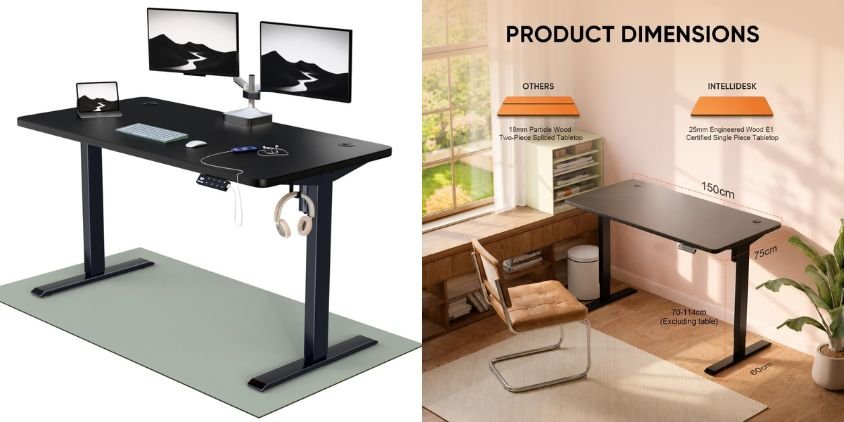
The Intellidesk Eco is a practical electric standing desk with an 80 kg load capacity, 3 memory presets, and a durable 25 mm E1-grade low-VOC tabletop. Its 30 × 60-inch surface provides useful space for gaming and work setups.
Key Specifications
| Feature | Details |
|---|---|
| Size | 30 × 60 inches |
| Capacity | 80 kg |
| Presets | 3 |
| Tabletop | 25 mm E1 Grade |
| Warranty | 5 Years |
Gaming Performance
Electric height adjustment and a preset controller make it easy to switch positions during long gaming sessions, while the spacious tabletop fits essential peripherals.
Pros and Cons
✓ Pros
- 3 presets, 80 kg capacity, 25 mm tabletop, 5-year warranty.
× Cons
- Lower capacity than some dual-motor desks.
Best For
1.3: Pro Series 150×75cm Electric Standing Desk
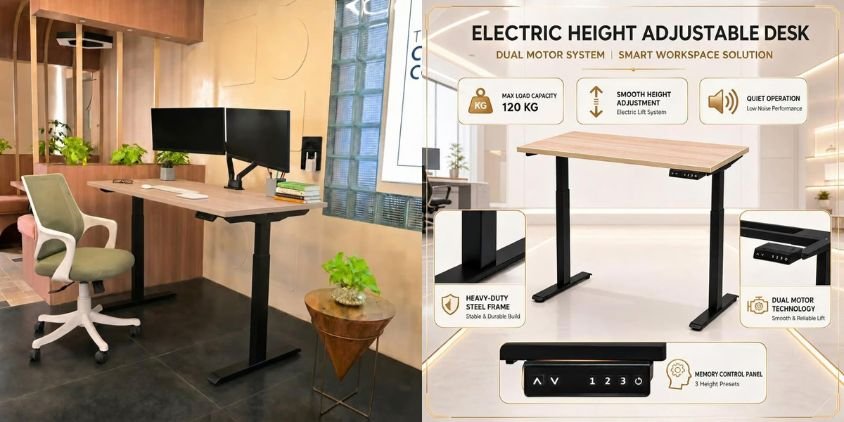
The Pro Series electric standing desk combines a spacious 150×75 cm walnut tabletop with a sturdy black frame. It features electric height adjustment, anti-collision protection, and three memory presets for convenient position changes.
Key Specifications
| Feature | Details |
|---|---|
| Size | 150 × 75 cm |
| Top | Walnut Tabletop |
| Presets | 3 Memory |
| Safety | Anti-Collision |
| Frame | Heavy-Duty |
| Installation | Free Installation |
Gaming Performance
The large tabletop comfortably accommodates multiple monitors, a keyboard, mouse, speakers, and other gaming accessories. Memory presets make switching between sitting and standing quick and convenient.
Pros and Cons
✓ Pros
- Spacious surface, sturdy frame, 3 presets, anti-collision, free installation.
× Cons
- Requires more floor space.
Best For
1.4: ARTIKEL Pisthol Height Adjustable Table for Office Work

The Artikel Dagger combines electric height adjustment with RGB lighting and practical gaming accessories. Its 72–118 cm range, memory preset, cup holder, and headset hooks make it a versatile desk for gaming and work.
Key Specifications
| Feature | Details |
|---|---|
| Height Range | 72–118 cm |
| Capacity | 80 kg |
| Lighting | RGB |
| Preset | Memory Preset |
| Accessories | Cup Holder, Headset Hooks |
| Warranty | 3 Years |
Gaming Performance
The spacious gaming surface and integrated RGB lighting create an immersive setup, while electric height adjustment allows comfortable sitting or standing during extended sessions.
Pros & Cons
✓ Pros
- RGB lighting, height adjustment, memory preset, accessories, 3-year warranty.
× Cons
- 80 kg capacity may limit heavier setups.
Best For
1.5: ARTIKEL Groove Height Adjustable Table

The ARTIKEL Groove is a compact electric standing desk with a 120 × 63 cm tabletop, roller shutter storage, and headphone hook.
Key Specifications
| Feature | Details |
|---|---|
| Size | 120 × 63 cm |
| Type | Electric |
| Storage | Roller Shutter |
| Accessory | Headphone Hook |
Gaming Performance
Its adjustable height supports comfortable gaming, while the compact surface fits a monitor and essential peripherals.
Pros and Cons
✓ Pros
- Electric adjustment, storage, headphone hook.
× Cons
- Limited space for multiple monitors.
Best For
2: Comparison Table
| Gaming Desk | Size | Height Adjustment | Weight Capacity | Key Feature | Best For |
|---|---|---|---|---|---|
| Kuber Dual Motor Standing Desk | 120 × 60 cm | Electric | 120 kg | Dual Motor, 4 Memory Presets, USB, Anti-Collision | Heavy gaming setups |
| Intellidesk Eco Electronic Desk | 30 × 60 in | Electric | 80 kg | 3 Presets, Touch Controller, 5-Year Warranty | Gaming & WFH |
| Pro Series Standing Desk | 150 × 75 cm | Electric | Heavy-Duty Frame | 3 Memory Presets, Anti-Collision | Multi-monitor setups |
| Artikel Dagger Gaming Desk | — | 72–118 cm | 80 kg | RGB Lighting, Cup Holder, Headset Hook | RGB gaming setups |
| ARTIKEL Groove Desk | 120 × 63 cm | Electric | — | Roller Shutter Storage, Headphone Hook | Compact setups |
3: How to Choose the Best Gaming Desk Under 25000
Check Desk Size
Choose 120 cm for compact setups and 150 cm for larger multi-monitor stations.
Height Adjustment
Look for a comfortable sitting/standing range and memory presets for quick adjustments.
Weight Capacity
Ensure it supports your monitors, PC, speakers, microphone, and accessories.
Dual Motors
Dual motors offer smoother, more balanced adjustment for heavier setups.
Stability
A strong frame and thick tabletop help reduce wobble during gaming.
Anti-Collision
Helps protect the desk and nearby equipment when adjusting height.
Cable Management
Choose desks with cable trays or grommets for a clean setup.
Gaming Features
Prioritize useful extras such as RGB lighting, USB ports, headphone hooks, cup holders, and storage.
4: Sitting vs Standing Gaming – Which Is Better?
Changing between sitting and standing can make long gaming and working sessions more comfortable and reduce prolonged static posture.
- Switch positions regularly for greater comfort.
- Adjustable desks make position changes quick and easy.
- Memory presets allow fast height adjustments.
- Keep the monitor near eye level to reduce neck strain.
- Position the keyboard and mouse comfortably to maintain relaxed shoulders and wrists.
For most gamers, alternating between sitting and standing with a properly adjusted desk setup is a practical approach.
5: Frequently Asked Questions (FAQs)
1. Which is the best gaming desk under 25000 in India?
The right choice depends on your desk size, available space, height adjustment, weight capacity, and gaming features.
2. Are electric height-adjustable gaming desks worth buying?
Yes. They make switching between sitting and standing simple and are useful for gaming, streaming, studying, and working.
3. What size gaming desk should I buy under 25000?
A 120 cm desk suits compact setups, while 150 cm or larger is better for dual monitors and more accessories.
4. How much weight should a gaming desk support?
Around 80 kg is sufficient for many setups. Heavy multi-monitor configurations can benefit from 100 kg or more.
5. Is a dual-motor gaming desk better than a single-motor desk?
Dual motors can provide greater lifting capability for heavier setups, but frame stability and overall build quality are equally important.
6. What should I look for when buying a gaming desk under 25000?
Check size, height range, weight capacity, stability, motors, anti-collision, memory presets, cable management, warranty, and gaming features such as RGB lighting and headphone hooks.
6: Conclusion
The best gaming desk under 25000 in India depends on your setup and requirements. Compare desk size, stability, height adjustment, weight capacity, and useful features such as memory presets, anti-collision, RGB, USB ports, and cable management.
Choose the model that best fits your monitor setup, equipment, available space, and gaming needs rather than focusing only on price.
Before buying, check the latest Amazon price, availability, warranty, and customer reviews to make an informed purchase.